Annotations
One often overlooked option is the ability to annotate ArchiMate elements in views. Although this feature is not part of the ArchiMate standard, Archi supports it. Annotations are, in my opinion, essential for creating meaningful views.
Moreover, as we will see in the final part of this series, annotations play a vital role in transforming architecture from a descriptive activity into a proactive one.
Textual Example
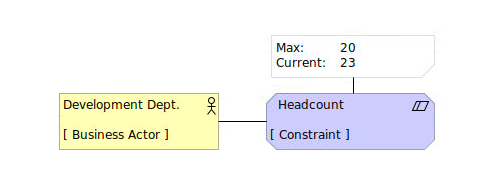
The sketch illustrates that the Development Department must adhere to a maximum headcount constraint of 20 employees, which is currently exceeded by 3.
Visual Example

In this example, the phases are associated with a business object that indicates the status of each phase.
The statuses can be extended (e.g., over budget, reconsider, etc.), making it easy to select all phases across projects that are, for instance, over budget, and create corresponding views. For details on how this was done in Archi, please refer to the separate page.